
Windows_IME


last modified 2007-05-30 20:51:44
Processing time 0.0067 sec


9.1. 조합 중인 문자 제거 
const HIMC hIMC = ::ImmGetContext( m_hWnd );
ImmNotifyIME(hIMC, NI_COMPOSITIONSTR, CPS_CANCEL, 0); ::ImmReleaseContext( m_hWnd, hIMC ); 9.2. 조합 윈도우 위치 조정 
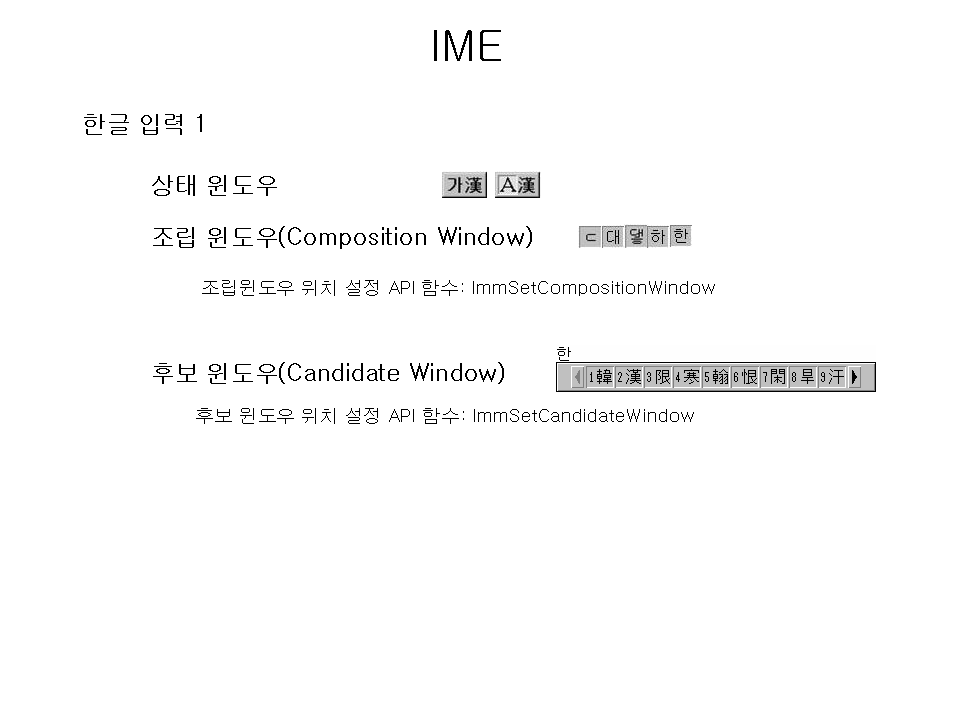
/// @brief 조합 윈도우의 위치를 설정한다.
/// @param x 조합 윈도우 시작 x위치값 /// @param y 조합 윈도우 시작 y위치값 void SetCompositionWindow(const int & x, const int & y) { HIMC hImc; COMPOSITIONFORM cf; memset(&cf, 0, sizeof(COMPOSITIONFORM)); cf.dwStyle = CFS_POINT; cf.ptCurrentPos.x = x; // x cf.ptCurrentPos.y = y; // y hImc = ImmGetContext(g_hWndMain); // 조합 윈도우의 위치를 설정한다. ImmSetCompositionWindow(hImc, &cf); ImmReleaseContext(g_hWndMain, hImc); } 9.3. 후보 윈도우 위치 조정 
/// @brief 후보 윈도우의 위치를 설정한다.
/// @param x 후보 윈도우 시작 x위치값 /// @param y 후보 윈도우 시작 y위치값 void SetCandidateWindow(const int & x, const int & y) { HIMC hImc = ImmGetContext(g_hWndMain); CANDIDATEFORM cf; memset(&cf, 0, sizeof(CANDIDATEFORM)); cf.dwStyle = CFS_CANDIDATEPOS; cf.ptCurrentPos.x = x; cf.ptCurrentPos.y = x; ImmSetCandidateWindow(hImc, &cf); ImmReleaseContext(g_hWndMain, hImc); } |
You attempt things that you do not even plan because of your extreme stupidity.    
|

![[http]](/imgs/http.png)
last modified 2007-05-30 20:51:44
Processing time 0.0067 sec